
Windows 7 Home Premium License Key | Legal Ways to Get One
A Windows 7 Home Premium license key is still useful when you need to test old software, check hardware compatibility, run a legacy program, or create a clean test machine. The important part is simple: use a real license. Random keys from forums, key generators, “lifetime activation” tools, and cheap bulk key websites are not a safe or legal way to activate Windows.
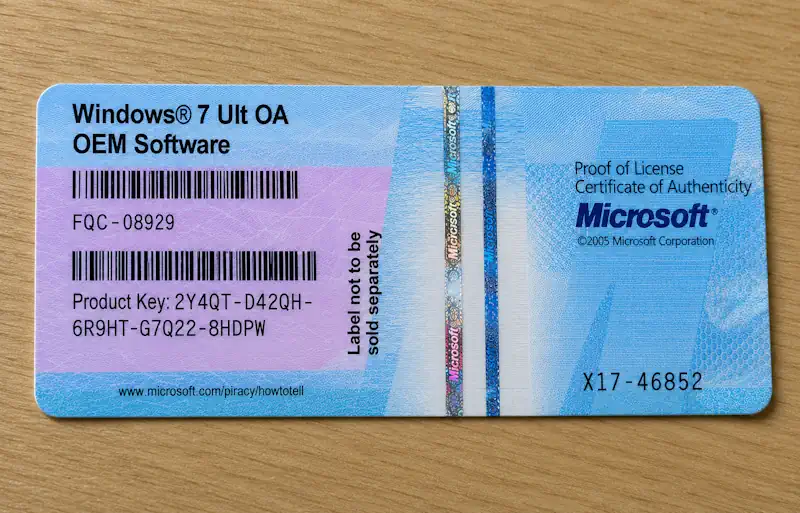
A genuine Windows 7 product key is a 25-character code in this format:
XXXXX-XXXXX-XXXXX-XXXXX-XXXXX
Here are the legal ways to get one.
Use an Old Retail Windows 7 Home Premium Box
The cleanest option is an unused or previously owned retail Windows 7 Home Premium license.
A retail copy usually came in a Microsoft box or official packaging with a product key card or sticker. If the license is retail, it is usually the best choice for a test PC or virtual machine because it is not tied to one specific computer in the same way as an OEM license.
Before buying one, check these points:
The edition must say Windows 7 Home Premium.
The product key must be readable.
The seller should include the original package, key card, disc, or proof that the license is genuine.
Avoid listings that sell only a key in a message or email with no original license material.
For testing, a real retail license is the most flexible legal option.
Use the COA Sticker from Your Own Old PC
Many older laptops and desktops came with a Certificate of Authenticity sticker. This sticker often has the Windows edition and product key printed on it.
Look for a label on the bottom of a laptop, under the battery, on the side of a desktop case, or inside the original documentation.
This can be a legal option if:
You own the original computer.
The sticker says Windows 7 Home Premium.
The key is still readable.
You are using it on the same machine it came with.
OEM keys are normally tied to the original computer. That means a Windows 7 Home Premium key from an old laptop is not the same as a retail key you can freely move to another PC. It is best used for reinstalling or testing Windows on the original device.
Buy a Used PC That Already Has a Windows 7 Home Premium License
Another legal option is to buy an old laptop or desktop that originally came with Windows 7 Home Premium.
This can be useful if you need a real test environment instead of a modern PC or virtual machine. For example, some old programs behave differently on real hardware than inside a VM.
Before buying, check that:
The PC has a readable COA sticker.
The edition is Windows 7 Home Premium.
The seller includes the original device, not just a loose sticker.
The license belongs with the machine.
This is usually safer than buying a random “Windows 7 key” online because the license and hardware stay together.
Check Your Old Email, Documents, and Software Boxes
If you bought Windows 7 Home Premium years ago, you may already have a legal key.
Check:
Old Microsoft Store emails.
Old retail software boxes.
PC repair invoices.
Laptop documentation.
Product key cards.
Photos of old COA stickers.
Backups of software purchase receipts.
Many users forget they already own a valid license. Before buying anything, search your own records first.
Use a Visual Studio Subscription If You Have One
Some Microsoft Visual Studio subscriptions include access to older Microsoft software downloads and product keys for development and testing. Availability depends on the subscription type and what Microsoft provides in that account.
If you have a subscription, sign in to the Visual Studio subscriptions portal and check:
Downloads
Product Keys
Search for:
Windows 7 Home Premium
or simply:
Windows 7
If the edition is available in your subscription, this can be a clean legal route for testing. Do not assume every subscription includes every old Windows edition. You need to check what is actually available in your account.
Use a Company License Only If It Covers Your Test
If you are testing for a company, school, lab, or IT department, ask the license administrator first.
Do not use a random company key just because it activates. The organization needs to have the correct licensing rights for that test machine, virtual machine, or lab setup.
Also, Windows 7 Home Premium is a consumer edition, so business licensing may not be the right route for this exact edition. If the company has access to other Windows 7 editions for testing, use the edition covered by the license instead of forcing Home Premium.
Avoid Cheap Key Websites
Many websites sell Windows 7 Home Premium keys for a very low price. Some may activate at first, but that does not automatically make them legal or reliable.
Avoid sellers that offer:
A key only, with no license proof.
Bulk keys.
“Instant activation” keys.
Keys from unknown regions.
COA stickers sold without the original device or license material.
Keygen or loader activation.
Activation by remote access.
A real license should have a clear source. If the seller cannot explain where the license came from, skip it.
Can You Test Windows 7 Home Premium Without Activating Immediately?
For a short test install, Windows may allow setup and initial use before activation is completed. This can be useful when you only need to check whether old software opens, whether a driver loads, or whether a test environment works.
But this is not a replacement for a license. If you continue using the system, activate it with a genuine Windows 7 Home Premium product key. Or you can use kmspico.
For a serious test machine, get the license first.
Best Legal Option for a Test Machine
For a virtual machine, the best option is a genuine retail Windows 7 Home Premium license.
For an old physical laptop or desktop, the best option is the original OEM COA key that belongs to that machine.
For development or software testing, check whether your Visual Studio subscription includes the correct Windows 7 edition.
For a company test, use only the license your organization actually owns and allows for that purpose.
Final Thoughts
A Windows 7 Home Premium license key should come from a real license, not from a random key list or activation tool. The safest legal sources are an old retail copy, the COA sticker from your own original PC, a used licensed computer, a valid Visual Studio subscription, or a properly managed organization license.
For a clean test launch, use the right edition, keep proof of the license, and avoid “key only” offers that look too cheap to be real.